


It's Sunday night and you're cross-checking a paper sign-in sheet against your bank app and a list of who paid cash. Someone attended four times on a pack that covered three. A monthly card payment failed in August and nobody noticed. Every hour spent on this is an hour not spent teaching or filling classes, and every missed payment is income you earned but never collected.
Class payment and attendance software records who booked, who paid, and who showed up in one place, then automates billing, reminders, and check-in. It's worth investing in once manual tracking takes more than a couple of hours a week or payments start slipping through the cracks.
Below, we run the numbers on a typical class business, list the signs you've outgrown a spreadsheet, and tell you plainly when you don't need software yet.
What class payment and attendance software actually does
The name covers two jobs that most small businesses handle with separate tools: collecting money and taking the register. Good software does both and connects them.
The payments side:
- Checkout at booking. Customers pay by card, Apple Pay, or Google Pay when they reserve a spot, so the money arrives before the class does.
- Recurring billing. Monthly memberships and autopay charge stored cards on schedule, with no invoices to send.
- Class packs and credits. A 10-class pack becomes a balance that goes down as it's used.
- Discounts, receipts, and refunds. Sibling or intro discounts apply automatically, receipts go out without you, and refunds or credits are logged against the right booking.
- Failed-payment handling. When a card declines, the system retries and tells someone.
The attendance side:
- Rosters built from bookings. Nobody retypes a class list. If they booked, they're on it.
- Tap-to-check-in. Instructors mark attendance on a phone or tablet at the door, mat, or poolside.
- Absence tracking. You can see who has missed sessions and how often.
- Reports and exports. Attendance history downloads as a CSV or PDF for your records, your accountant, or a funder.
The connection is where the real value sits. The roster only shows paid spots, pack credits come off at check-in, and your reports put attendance and revenue for each class side by side. Our attendance tracker and digital class roster work this way: bookings flow straight onto the register, so the list you check people in from is always the list of people who paid.

The hidden costs of tracking payments and attendance by hand
Paper registers and spreadsheets are free to start. They cost you later, in time, in missed money, and in students who leave before you notice.
Admin hours
Every manual system adds the same weekly chores: typing up sign-in sheets, matching bank transfers to names, chasing people who owe, and answering "how many classes have I got left?" messages. None of it takes long on its own. Together it often eats two to five hours a week for a business running a handful of classes, and the owner usually does it after teaching hours.
That time has a price even if you never pay yourself for it. At $25 an hour, four hours a week is more than $400 a month of your time spent on data entry.
Payments that quietly slip
Class businesses leak money in small amounts. "I'll pay next week" turns into three weeks. Cash goes in a drawer and never reaches the spreadsheet. A pack gets used for an extra class because nobody was counting. A monthly card payment fails and the student keeps coming.
Late payment is a problem for small businesses across the board. The QuickBooks 2026 Small Business Late Payments Report found that 59% of US small businesses have invoices overdue by 30 days or more, up from 47% a year earlier, and 39% of owners said a single late payment made it hard to cover payroll or bills. Those figures cover all small businesses, not only class-based ones, but the pattern is familiar to anyone who collects fees from dozens of people each month.
Errors and version conflicts
Spreadsheets break in predictable ways. A student joins mid-term and a formula stops adding up. Two instructors keep their own copies and neither is right. A paper sign-in sheet gets rained on at an outdoor session, or someone's signature is unreadable. Each mistake is minor, but each one takes time to find and fix.
No early warning when students drift
A register tells you who came today. It doesn't tell you that a student who used to come twice a week has missed the last three sessions. By the time you notice, they've often already decided to leave. We cover this in more detail below, because it's one of the strongest reasons to switch.
Why payments and attendance belong in the same system
Many businesses that move off paper end up with two tools: one for taking payments and another for rosters. That's better than a spreadsheet, but the two still don't talk to each other, so you're back to reconciling. Here's what changes when both live in one place.
A student checks in, but their payment failed. Their monthly card was declined three weeks ago. With separate tools, the instructor has no idea and the student keeps attending unpaid until someone does the month-end check, if anyone does. In one system, the failed payment shows up against their account and on the roster, so you can have a friendly word at the door that day.
A class pack runs down on its own. A customer buys a 10-class pack. Every check-in takes off one credit automatically, and when they get down to the last couple, they get a reminder to renew. You never count by hand, and the renewal happens before the pack runs out rather than after. For more ways to grow this revenue stream, see our guide on selling more class packs.
A no-show on a paid drop-in. Someone books, pays, and doesn't come. Because attendance and payments are linked, you can apply your no-show or late-cancellation policy consistently instead of from memory. If you haven't written one yet, our cancellation and refund policy examples are a good starting point.
The bigger payoff shows up in your reports. When revenue per class and attendance per class sit next to each other, you can see which classes to grow, which to merge, and which fill a slot on the calendar without earning much.
How it handles each way you charge for classes
Class businesses rarely use one payment model. A fitness studio might sell drop-ins, 10-class packs, and a monthly unlimited membership all at once, while a kids' program charges by the term. Each model breaks in its own way on a spreadsheet.
| Payment model | What goes wrong on a spreadsheet | What software automates |
|---|---|---|
| Pay per class / drop-in | Cash not logged, "I'll pay next time" never followed up | Payment at booking, so the roster only shows paid spots |
| Class packs / credits | Manual tallying, packs used past their limit | Credits deducted at check-in, low-balance reminders, expiry dates |
| Monthly membership / autopay | Failed cards go unnoticed, cancellations missed | Recurring billing, failed-payment retries and alerts |
| Term or semester fees | Installments tracked by hand, sibling discounts, partial refunds | Family accounts, automatic discounts, refunds or credit logged against the booking |
| Free trial classes | Trial students never followed up | Trial tickets and automated follow-up emails to convert them |
Autopay deserves a closer look, because its failures are silent. Recurly's churn rate benchmarks (July 2026) put average involuntary churn, meaning subscribers lost to failed payments rather than a decision to cancel, at 1.25% of subscribers a month. In education it's 1.69%, the highest of the industries tracked. At the education rate, 120 monthly members means roughly two people a month whose payments stop without them meaning to leave. Catch them quickly and most will update their card. Miss them and they either keep attending for free or drift away.
On our Standard plan, you can sell session passes and class packs, run flexible monthly subscriptions, create trial tickets, and set up discount codes. Premium adds waitlists for full sessions, automated trial follow-up emails, and account credit for customers.

Attendance data is your best early warning for dropouts
Most students don't quit suddenly. They come less often, then stop. Attendance records show that slide weeks before a cancellation email arrives.
The fitness industry has studied this for years. The Health & Fitness Association (formerly IHRSA) notes that the more often members use their facility, the more likely they are to stay. The same article reports that members who don't exercise in groups carry a 56% higher cancellation risk than those who do, and that the members most likely to quit are those who haven't attended for more than a week but did attend within the last two weeks. In other words, a recent regular who has just gone quiet is the person to call.
That finding comes from gyms, but it applies to any recurring class. It's the parent whose child stopped turning up to Saturday gymnastics after a tough week. It's the adult who drifted away from a 6am HIIT class when work got busy.
A simple rule works well: flag anyone who misses two sessions in a row and reach out personally. A short, friendly message ("We missed you on Tuesday, everything okay?") is often enough to bring someone back. Software makes this a report you glance at each week. With a spreadsheet, it's a chore that rarely gets done.
Does it pay for itself? A worked example
This is the question behind the whole decision, so here's the math. The numbers below are an illustrative example, not measured customer data. Swap in your own.
Assumptions:
- 120 active students paying an average of $80 a month, so $9,600 a month in revenue.
- The owner's admin time is valued at $25 an hour.
- The business already takes most payments by card.
What the software costs. Our Standard plan is $45 a month ($450 a year on annual billing). We charge a 0.59% application fee on online payments, which on $9,600 is about $57. That's roughly $102 a month in total.
Card processing is separate. Stripe's standard US rate is 2.9% + 30¢ per card charge, which on this example comes to around $314 a month. If you already take card payments through a reader or payment link, you're paying something similar today, so it isn't a new cost. If you're moving from cash and checks, add it to your side of the ledger.
What you get back (conservatively):
- Admin time. Saving 4 hours a week × 4.33 weeks × $25 = about $433 a month.
- Payments that no longer slip. If 2% of revenue currently goes missing through unlogged cash, over-used packs, and unnoticed failed cards, that's about $192 a month.
- One retained student. Keeping a single $80-a-month student who would otherwise have drifted is $80 a month, or $960 over a year.
| Item | Monthly |
|---|---|
| Software cost (subscription + 0.59% fee) | -$102 |
| Admin time saved (4 hours/week at $25) | +$433 |
| Payments recovered (2% of revenue) | +$192 |
| One retained student | +$80 |
| Net monthly value | about +$600 |
Even if you halve every benefit, the software still covers its own cost more than three times over. The biggest line is time, which is also the one owners tend to underrate because nobody sends them an invoice for it.
Run your own numbers:
(Hours per week on payments and registers × 4.33 × your hourly value) + (monthly revenue × the share that slips) vs. subscription + fees
If the left side is bigger, the software pays for itself. You can check current plan prices on our pricing page.

7 signs you've outgrown spreadsheets
If three or more of these sound familiar, manual tracking is costing you more than software would.
- You spend more than two hours a week reconciling. Matching payments to registers is taking time that should go to teaching or marketing.
- You can't answer "who owes me money right now?" in under a minute. If the answer means opening three files, the system isn't working.
- You run more than three or four classes, or more than one person takes the register. That's the point where copies start to disagree.
- You sell class packs or memberships and track credits by hand. Hand counting always drifts, and it drifts in the customer's favor.
- A card payment failed and you found out weeks later. Or worse, the customer told you.
- Customers message you to ask what they owe or how many classes they have left. Every one of those messages is admin a self-service account would handle.
- You can't tell which classes make money. Without revenue and attendance per class in one view, you're scheduling on gut feel.
Not ready to switch yet? Our free attendance sign-in sheet is a tidy stopgap for keeping paper registers consistent.
When you don't need software yet
Software isn't the right call for everyone. If you're a solo instructor with one weekly class of under 10 regulars, and everyone pays the same way (say, a monthly bank transfer on the first of the month), a simple spreadsheet and a printed sign-in sheet will do the job. The admin takes a few minutes a week and there's little room for money to go missing.
Revisit the decision when any of these change:
- You add a second class or a second instructor.
- You start selling class packs or drop-ins alongside regular fees.
- You move to autopay or monthly memberships.
- You notice you're chasing the same people for payment more than once.
If you want to test online booking without committing to a monthly fee, our roundup of free class booking systems covers the no-cost options and their limits.
What to look for in class payment and attendance software
Once you've decided to switch, use this checklist to compare options.
- Payments and check-in in one system. Two tools stitched together recreate the reconciliation problem you're trying to escape.
- Every payment model you use. Drop-ins, packs, memberships, term fees, and trials should all work without workarounds.
- Failed-payment alerts and retries. Autopay is only reliable if declined cards get flagged quickly.
- Mobile check-in. Instructors should be able to take attendance on a phone at the mat, the poolside, or the church hall door, with no laptop needed.
- Customer self-service. Students and parents should be able to see their bookings, pay, and update a card without emailing you.
- Exportable reports. CSV or PDF exports keep your accountant happy and give you a record if you ever change systems.
- Transparent pricing. A flat monthly fee plus a clearly stated per-transaction fee is easy to budget for. Be wary of per-student pricing that charges you more every time you grow.
- Fast setup and a free trial. You should be able to set up a real class and check yourself in before paying anything.
For a wider look at what's out there, see our roundups of the best online booking and payment systems and the best class registration software.
How to switch mid-term without losing track
You don't need to wait for a new term to switch, but you do need a plan so no balance or credit gets lost along the way.
- Pick a clean cutover date. The start of a month or a new block of classes keeps billing simple.
- Export everything from your spreadsheet. Names, contact details, emergency and medical notes, current balances, and remaining pack credits.
- Set up your classes and payment options. Create each class, its schedule and capacity, and every price you charge. Then import your customers.
- Carry balances over. Add remaining pack credits and prepaid amounts to each account, and note anyone who still owes you.
- Invite existing customers to book and pay online. Send a short email explaining the change, and give stragglers a week or two of overlap.
- Run paper and digital check-in side by side for one week. Once the digital roster matches the paper one, retire the paper.
- Archive the old spreadsheet. Keep a read-only copy for your records and tax purposes.
How we handle class payments and attendance at Pembee
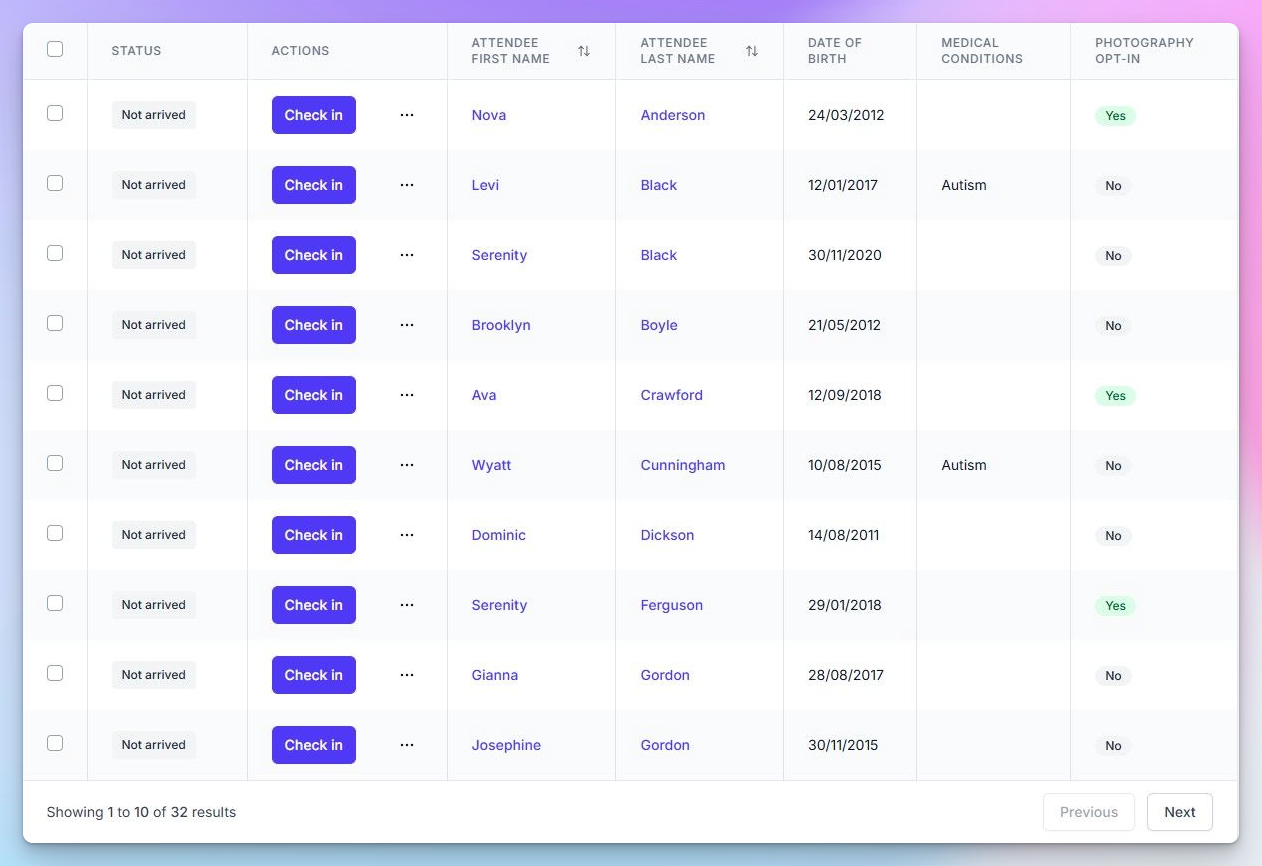
We built Pembee for businesses that run classes, courses, camps, and programs, so payments and attendance sit in the same place from the start. Customers book and pay online, and their booking lands straight on your roster. Instructors check people in with our check-in app, and you can export attendance reports as CSV or PDF whenever you need them.
On the payments side, you can sell class packs and session passes, run monthly subscriptions, create trial tickets, offer discount codes, and send booking reminders automatically. Customers can pay by card, Apple Pay, Google Pay, or Klarna. Premium adds waitlists, automated trial follow-ups, monthly transaction reports, and account credit.
Plans start at $45 a month, plus a 0.59% application fee on online payments and standard Stripe processing. There's a 30-day free trial with no credit card required.
Owners use Pembee across a wide range of activities, from fitness class booking software and dance studio software to martial arts software and afterschool program software. You can browse every use case on our solutions page.
If you're still weighing up the move from paper, our breakdown of the benefits of an online booking system covers the wider case beyond payments and registers.

Key takeaways
- Class payment and attendance software is worth it once manual tracking takes more than about two hours a week or payments start slipping.
- The biggest benefit comes from connecting payments and attendance, so rosters only show paid spots and pack credits deduct at check-in.
- Failed autopay payments are a silent leak. Recurly puts involuntary churn at 1.69% a month in education.
- Attendance is an early warning for dropouts. Reach out to anyone who misses two sessions in a row.
- In our worked example, about $102 a month of software returns roughly $700 a month in time and recovered revenue, or about $600 net.
- A solo instructor with one small, simple class can stick with a spreadsheet for now.
FAQs
How much does class payment and attendance software cost?
Most tools charge a flat monthly fee, a per-transaction fee on online payments, or both, plus card processing. Our plans start at $45 a month with a 0.59% application fee on online payments, and Stripe's standard processing on top. Watch for per-student pricing, which gets more expensive as you grow.
Can I track class attendance for free?
Yes. For a small class, a spreadsheet or our free printable sign-in sheet works well. Free tools stop being practical once you have several classes, multiple instructors, or payments to reconcile against the register.
Is a spreadsheet good enough for tracking student payments?
It can be for a handful of students who all pay the same way. Spreadsheets struggle with class packs, autopay, mid-term joiners, and more than one person editing, which is when errors and missed payments creep in.
Can the software handle cash and check payments?
Yes. Most systems let you record offline payments against a customer's booking so your roster and balances stay accurate. Taking payment online at booking also means fewer cash payments to log by hand in the first place.
What happens when a recurring payment fails?
In a system built for recurring billing, a declined card is retried automatically and flagged, so you and the customer know to update the card. Without that, a failed payment often goes unnoticed until month-end or later.
How do I know if software will pay for itself?
Multiply your weekly admin hours by 4.33 and your hourly value, then add the share of revenue that slips each month. If that total is bigger than the subscription plus fees, the software pays for itself. In our worked example of 120 students, it pays for itself several times over.
Can students or parents check their own balance and bookings?
With a customer account, yes. They can see upcoming bookings, remaining class credits, and payment history, and update their card without messaging you.
How long does it take to switch from a spreadsheet?
Setting up your classes and prices takes an afternoon for most small businesses. Moving customers over takes a week or two, including a short overlap where you run paper and digital check-in side by side.
Does attendance tracking help with student retention?
Yes. Fitness industry research links attendance frequency to retention, and a recent regular who stops coming is the most likely to cancel. Tracking absences lets you reach out before they leave.